パフォーマンス
合格フレームレート: 平均 60 fps、p5 59.5 · ロングタスク: 0 件、合計 0 ミリ秒、最長 0 ミリ秒 · ソース gzip 2.2 KB · 実行時 2.0 KB
ordinary-crab-91MITカードUiverse.io
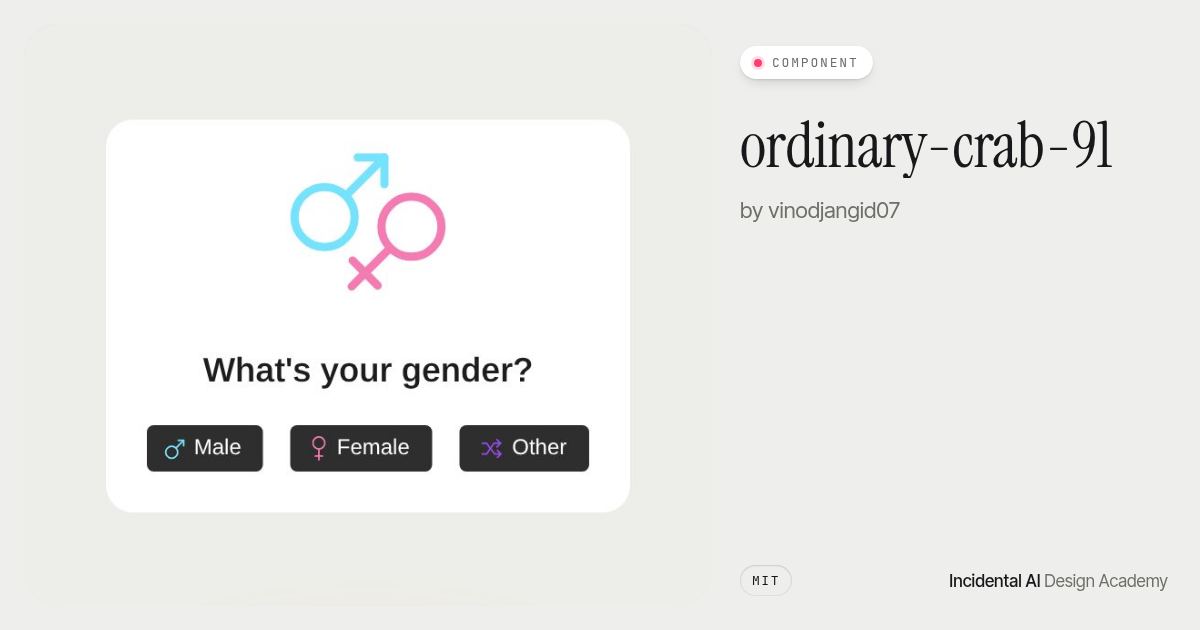
vinodjangid07 が HTML と CSS だけで作ったカードです。Uiverse.io から MIT ライセンスで収録し、ここで実際に動かしています。
品質レポート
評価と点数は、ビルドまたはテスト時に実行した自動チェックの結果です。未実施の項目は「未テスト」と表示し、数字を仮置きすることはありません。
フレームレート: 平均 60 fps、p5 59.5 · ロングタスク: 0 件、合計 0 ミリ秒、最長 0 ミリ秒 · ソース gzip 2.2 KB · 実行時 2.0 KB
問題 0 · スクリーンリーダー: 注意
継続する動きはない
はみ出しなし
フレームレートとロングタスクは、ヘッドレスの Chromium 上でソフトウェア WebGL を使って測定しています。このサイト内のコンポーネント同士の比較にのみ用いてください。実機の数値ではありません。
該当なし。静止時に見えるアニメーションはありません。ホバーで始まるアニメーションは未テストです。
axe-core の違反はありません。
検査日 2026年11月15日 · 数値は自動スクリプトによるもので、手書きの見本ではありません。
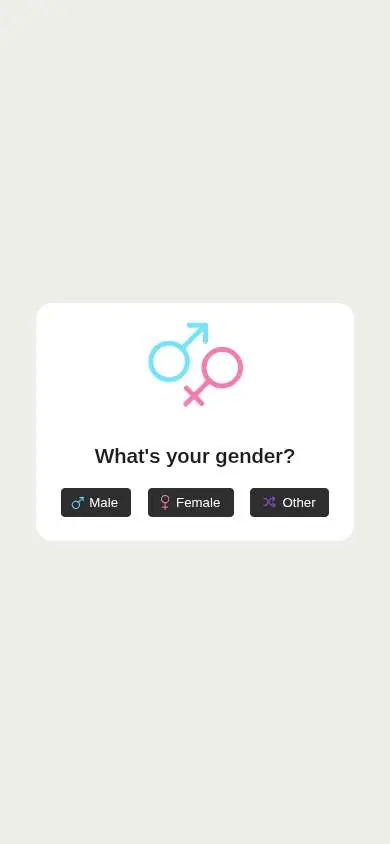
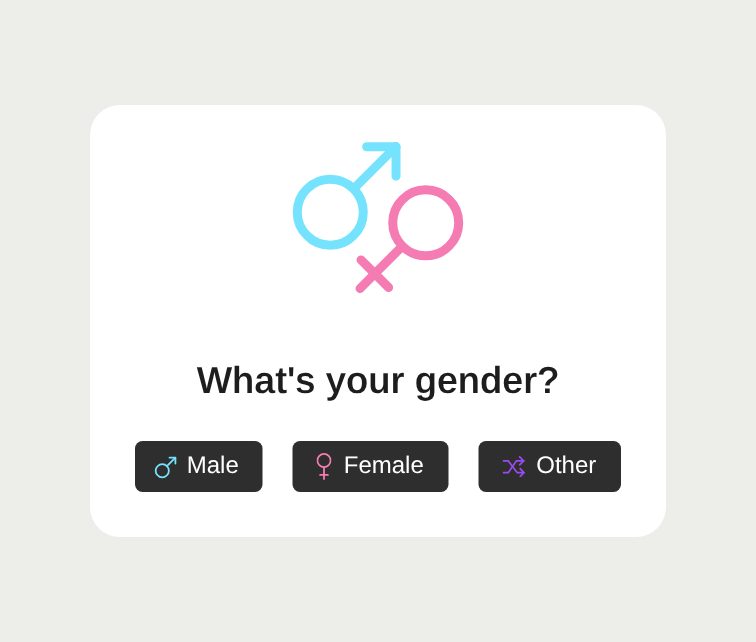
実寸で表示しています。
コピーした内容の先頭にライセンス表記があります。使うときは残してください。
<div class="gender-card">
  <div class="large-svg-container">
    <svg
      xmlns="http://www.w3.org/2000/svg"
      fill="none"
      viewBox="0 0 50 90"
      class="largemalesvg"
      height="90"
      width="50"
    >
      <circle stroke-width="6" stroke="#76E3FE" r="22" cy="25" cx="25"></circle>
      <path
        stroke-linecap="round"
        stroke-width="6"
        stroke="#76E3FE"
        d="M25 47L25 87"
      ></path>
      <path
        stroke-linecap="round"
        stroke-width="6"
        stroke="#76E3FE"
        d="M25 86.6958L38.6958 73"
      ></path>
      <path
        stroke-linecap="round"
        stroke-width="6"
        stroke="#76E3FE"
        d="M11 73L24.6958 86.6958"
      ></path>
    </svg>

    <svg
      xmlns="http://www.w3.org/2000/svg"
      fill="none"
      viewBox="0 0 50 90"
      class="largefemalesvg"
      height="90"
      width="50"
    >
      <circle stroke-width="6" stroke="#F57CB3" r="22" cy="25" cx="25"></circle>
      <path
        stroke-linecap="round"
        stroke-width="6"
        stroke="#F57CB3"
        d="M25 47L25 87"
      ></path>
      <path
        stroke-linecap="round"
        stroke-width="6"
        stroke="#F57CB3"
        d="M12 73H38"
      ></path>
    </svg>
  </div>
  <form action="#">
    <p class="heading">What's your gender?</p>
    <div class="radio-wrapper">
      <input
        class="gender-radio-buttons"
        id="male"
        value="male"
        name="gender"
        type="radio"
      />
      <label class="genderlabel malebutton" for="male">
        <svg
          xmlns="http://www.w3.org/2000/svg"
          fill="none"
          viewBox="0 0 50 90"
          class="smallsvg malesmallsvg"
        >
          <circle
            stroke-width="6"
            stroke="#76E3FE"
            r="22"
            cy="25"
            cx="25"
          ></circle>
          <path
            stroke-linecap="round"
            stroke-width="6"
            stroke="#76E3FE"
            d="M25 47L25 87"
          ></path>
          <path
            stroke-linecap="round"
            stroke-width="6"
            stroke="#76E3FE"
            d="M25 86.6958L38.6958 73"
          ></path>
          <path
            stroke-linecap="round"
            stroke-width="6"
            stroke="#76E3FE"
            d="M11 73L24.6958 86.6958"
          ></path></svg
        >Male
      </label>

      <input
        class="gender-radio-buttons"
        id="female"
        value="female"
        name="gender"
        type="radio"
      />
      <label class="genderlabel femalebutton" for="female">
        <svg
          xmlns="http://www.w3.org/2000/svg"
          fill="none"
          viewBox="0 0 50 90"
          class="smallsvg"
        >
          <circle
            stroke-width="6"
            stroke="#F57CB3"
            r="22"
            cy="25"
            cx="25"
          ></circle>
          <path
            stroke-linecap="round"
            stroke-width="6"
            stroke="#F57CB3"
            d="M25 47L25 87"
          ></path>
          <path
            stroke-linecap="round"
            stroke-width="6"
            stroke="#F57CB3"
            d="M12 73H38"
          ></path></svg
        >Female
      </label>

      <input
        class="gender-radio-buttons"
        id="other"
        value="other"
        name="gender"
        type="radio"
      />
      <label class="genderlabel otherbutton" for="other">
        <svg
          xmlns="http://www.w3.org/2000/svg"
          fill="none"
          viewBox="0 0 78 75"
          class="smallsvg other-gender"
        >
          <path
            stroke-linecap="round"
            stroke-width="6"
            stroke="#9B4AED"
            d="M73.4657 16.6983L48.2159 16.6984L19.9816 58.0001L2.99911 58"
          ></path>
          <path
            stroke-linecap="round"
            stroke-width="6"
            stroke="#9B4AED"
            d="M73.1641 16.698L59.4705 2.99992"
          ></path>
          <path
            stroke-linecap="round"
            stroke-width="6"
            stroke="#9B4AED"
            d="M59.4648 30.696L73.1629 17.0024"
          ></path>
          <path
            stroke-linecap="round"
            stroke-width="6"
            stroke="#9B4AED"
            d="M74.022 57.8121L51.1697 57.8121L19.9997 16.9999L3 17"
          ></path>
          <path
            stroke-linecap="round"
            stroke-width="6"
            stroke="#9B4AED"
            d="M73.748 57.8123L61.3547 71.51"
          ></path>
          <path
            stroke-linecap="round"
            stroke-width="6"
            stroke="#9B4AED"
            d="M61.3496 43.8147L73.747 57.5079"
          ></path>
        </svg>

        Other
      </label>
    </div>
  </form>
</div>/* From Uiverse.io by vinodjangid07 - Website: https://www.patreon.com/posts/animated-gender-78055964?utm_medium=clipboard_copy&utm_source=copyLink&utm_campaign=postshare_fan&utm_content=join_link - Name: Online Tutorials - Tags: form, card, hover, radio, gender, buttons */
.gender-card {
width: fit-content;
height: fit-content;
background-color: rgb(255, 255, 255);
display: flex;
align-items: center;
flex-direction: column;
justify-content: flex-start;
padding: 30px;
border-radius: 20px;
font-family: Arial, Helvetica, sans-serif;
gap: 25px;
}
.large-svg-container {
width: auto;
height: auto;
display: flex;
align-items: center;
justify-content: center;
transform: rotate(45deg);
}
.largemalesvg {
transform: rotate(180deg);
}
.heading {
color: #1d1d1d;
font-weight: 600;
font-size: 25px;
text-align: center;
}
.gender-radio-buttons {
display: none;
}
.smallsvg {
width: 10px;
}
.other-gender {
width: 15px;
}
.malesmallsvg {
transform: rotate(225deg);
}
.genderlabel {
display: flex;
align-items: center;
justify-content: center;
width: fit-content;
height: fit-content;
background-color: rgb(46, 46, 46);
border-radius: 5px;
padding: 8px 16px;
gap: 8px;
color: white;
cursor: pointer;
transition: all 0.3s ease-out;
}
.radio-wrapper {
display: flex;
align-items: center;
justify-content: center;
gap: 20px;
margin-top: 25px;
}
.femalebutton:hover {
background-color: rgb(245, 185, 195);
}
.malebutton:hover {
background-color: #569fcf;
}
.otherbutton:hover {
background-color: #4d227a;
}
#female:checked + .femalebutton {
background-color: rgb(245, 185, 195);
transform: scale(1.1);
}
#male:checked + .malebutton {
background-color: #569fcf;
transform: scale(1.1);
}
#other:checked + .otherbutton {
background-color: #4d227a;
transform: scale(1.2);
}コントロール · HTML · CSS · JS
コードを編集し、コントロールで調整できます。入力に合わせてプレビューが更新されます。
すべてのコンポーネントをその場で編集し、コントロールで調整し、全ソースをダウンロードし、上級プロンプトをコピーできます。
買い切り $49仮の価格
テストモード:実際の支払いは発生しません。
無料:プレビュー、コピーボタン、レッスンの解説。
質問とアイコン ラジオ ボタンの上に 2 つの大きなイラストが描かれた丸い白いカードにより、個人的な質問がフレンドリーに感じられます。
オンボーディング調査、プロフィール設定、フィットネス アプリ。
30px パディング、20px 半径、25px ギャップ、および選択したラベルの色を変更します。
素の HTML・CSS・JavaScript(フレームワークなし)で「性別選択カード」コンポーネントを作ってください。質問とアイコン ラジオ ボタンの上に 2 つの大きなイラストが描かれた丸い白いカードにより、個人的な質問がフレンドリーに感じられます。 使いどころ:オンボーディング調査、プロフィール設定、フィットネス アプリ。 調整できる項目:30px パディング、20px 半径、25px ギャップ、および選択したラベルの色を変更します。 ライトとダークのテーマに対応し、prefers-reduced-motion では静止画にし、文字は読みやすく、操作はキーボードでもできるようにしてください。有料や制限付きのコンポーネントライブラリからはコピーせず、オリジナルのコードで書いてください。
調整、アクセシビリティ、組み込み手順まで含む長めのプロンプトです。
 Yaya12085
 Lucas Bassetti
 Lucas Bassetti
 Lucas Bassetti
 Lucas Bassetti
 shadowmurphy
 DellBee
 Aryan-81