效能
通過幀率: 平均 60 fps,p5 59.9 · 長任務: 0 個,共 0 毫秒,最長 0 毫秒 · 原始碼 gzip 2.3 KB · 執行時 1.5 KB
terrible-emu-64MIT提示Uiverse.io
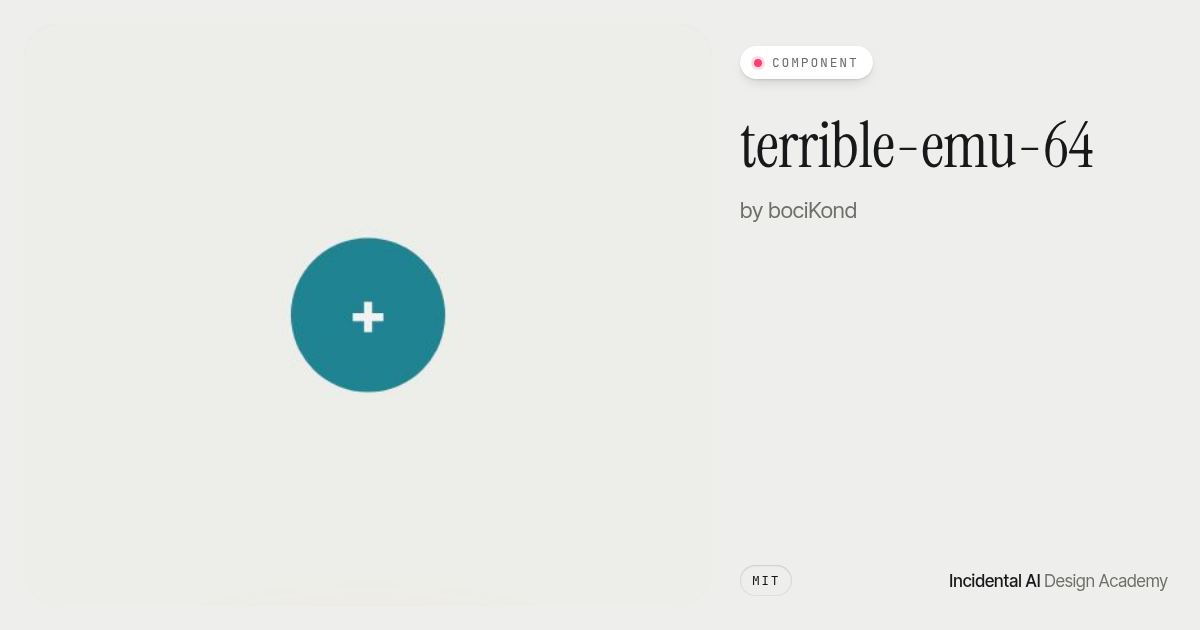
bociKond 用純 HTML 和 CSS 做的提示。依 MIT 授權從 Uiverse.io 收錄,此處為即時預覽。
品質報告
等級和分數來自建置或測試時跑過的自動檢查。沒跑過的項目會標成「未檢測」,不會填假資料。
幀率: 平均 60 fps,p5 59.9 · 長任務: 0 個,共 0 毫秒,最長 0 毫秒 · 原始碼 gzip 2.3 KB · 執行時 1.5 KB
問題 0 · 讀屏: 需注意
沒有持續動效
無溢出
幀率和長任務是在無介面的 Chromium 裡用軟體 WebGL 測的,只適合在本站元件之間比較,不代表實機表現。
不適用:靜止時沒有可見動畫;由懸停觸發的動畫沒有測試。
沒有 axe-core 違規。

檢測於 2026年11月15日 · 資料來自自動腳本,不是手工填寫。
以實際尺寸顯示。
複製內容以授權聲明開頭,使用程式碼時請保留。
<div class="tooltip-container">
  <span class="tooltip">
    <svg
      xmlns="http://www.w3.org/2000/svg"
      viewBox="0 0 64 64"
      height="64"
      width="64"
      class="svg"
    >
      <path
        d="M50.27 6.44997C47.2255 5.1936 43.8836 4.84045 40.6437 5.43274C37.4039 6.02503 34.4031 7.5377 32 9.78997C23.57 2.35997 13.8 4.63997 8.05998 10.14C2.05998 15.88 -0.590017 26.14 7.68998 35.14C8.22998 35.83 31 58.46 31 58.46C31.2829 58.7415 31.6658 58.8995 32.065 58.8995C32.4641 58.8995 32.847 58.7415 33.13 58.46L56.34 35.21C58.4116 33.1493 59.9346 30.603 60.7702 27.8031C61.6058 25.0032 61.7275 22.0387 61.1241 19.1797C60.5207 16.3207 59.2114 13.6582 57.3156 11.4348C55.4197 9.21134 52.9976 7.49768 50.27 6.44997V6.44997Z"
      ></path>
    </svg>
    <svg
      viewBox="0 0 48 48"
      xmlns="http://www.w3.org/2000/svg"
      data-name="Layer 1"
      id="Layer_1"
      class="svg"
    >
      <path
        d="M42.455,31.235l-2.267-2.266a5.274,5.274,0,0,0-7.459,0l-1.3,1.3a3.287,3.287,0,0,1-4.132.409A35.791,35.791,0,0,1,17.322,20.7a3.283,3.283,0,0,1,.409-4.132l1.3-1.3a5.274,5.274,0,0,0,0-7.459L16.765,5.545a5.279,5.279,0,0,0-7.459,0L6.8,8.054a9.535,9.535,0,0,0-2.769,7.484A21.294,21.294,0,0,0,8.232,26.7,65.334,65.334,0,0,0,21.3,39.769a21.3,21.3,0,0,0,11.162,4.2c.246.018.491.028.736.028a9.536,9.536,0,0,0,6.748-2.8l2.509-2.509a5.274,5.274,0,0,0,0-7.459Z"
      ></path>
    </svg>
    <svg
      xmlns:xlink="http://www.w3.org/1999/xlink"
      xmlns="http://www.w3.org/2000/svg"
      xml:space="preserve"
      viewBox="0 0 24 24"
      version="1.1"
      style="enable-background:new 0 0 24 24;"
      class="svg"
    >
      <g id="info"></g>
      <g id="icons">
        <path
          id="share"
          d="M21.7,10.2l-6.6-6C14.6,3.7,14,4.2,14,5v3c-4.7,0-8.7,2.9-10.6,6.8c-0.7,1.3-1.1,2.7-1.4,4.1   c-0.2,1,1.3,1.5,1.9,0.6C6.1,16,9.8,13.7,14,13.7V17c0,0.8,0.6,1.3,1.1,0.8l6.6-6C22.1,11.4,22.1,10.6,21.7,10.2z"
        ></path>
      </g>
    </svg>
  </span>
  <span class="text">+</span>
</div>/* From Uiverse.io by bociKond - Website: https://codepen.io/milanraring/pen/JjoamZx - Name: Milan Raring - Tags: simple, tooltip, social, notification */
.tooltip-container {
--white: #f2f2f2;
--background: #1f8392;
position: relative;
background: var(--background);
cursor: pointer;
transition: all 0.2s;
font-size: 2rem;
font-weight: 900;
color: var(--white);
width: 5rem;
aspect-ratio: 1/1;
display: flex;
align-items: center;
justify-content: center;
border-radius: 50%;
}
.tooltip {
position: absolute;
top: 0;
left: 50%;
transform: translateX(-50%);
padding: 0.3em 0.6em;
opacity: 0;
pointer-events: none;
background: var(--background);
transition: all 300ms;
fill: white;
display: flex;
align-items: center;
gap: 0.3rem;
border-radius: 30rem;
}
.tooltip .svg {
height: 3rem;
aspect-ratio: 1/1;
cursor: pointer;
}
.tooltip .svg:nth-child(2) {
width: 4rem;
}
.tooltip::before {
position: absolute;
content: "";
height: 0.6em;
width: 0.6em;
bottom: -0.2em;
left: 50%;
transform: translate(-50%) rotate(45deg);
background: var(--background);
}
.tooltip-container .text {
transition: all 600ms;
}
.tooltip-container:hover .text {
transform: rotate(225deg);
}
.tooltip-container:hover .tooltip {
top: -100%;
opacity: 1;
visibility: visible;
pointer-events: auto;
}控制項 · HTML · CSS · JS
直接改程式碼,再用控制項微調,預覽會隨輸入即時更新。

線上編輯每個元件,用控制項微調,下載完整原始碼,複製進階提示詞。
一次性 $49暫定價格
測試模式:不會真的扣款。
免費:預覽、複製按鈕和課程說明。
圓形青色加號按鈕,懸停時上方出現同色膠囊,裡面是幾個社交圖示,分享入口平時藏起來。
分享操作、快速新增選單和懸浮操作按鈕。
改 --background(#1f8392)、--white、5rem 按鈕尺寸和 300ms 顯現。
用純 HTML、CSS 和 JavaScript(不用框架)做一個「加號分享提示」元件。圓形青色加號按鈕,懸停時上方出現同色膠囊,裡面是幾個社交圖示,分享入口平時藏起來。 適用場景:分享操作、快速新增選單和懸浮操作按鈕。 開放這些可調項:改 --background(#1f8392)、--white、5rem 按鈕尺寸和 300ms 顯現。 支援淺色和深色主題,遵守 prefers-reduced-motion 並給出靜止畫面,保證文字清晰、控制元件可用鍵盤操作。請寫原創程式碼,不要從付費或受限的元件庫複製。
更完整的提示詞,包含調參、無障礙和接入步驟。
 Lucas Bassetti
 Javierrocadev
 Sacha-PDV
 Lucas Bassetti
 vinodjangid07
 Lucas Bassetti
 andrew-demchenk0
 akshat-patel28