Performance
PassFrame rate: 60 fps average, p5 59.9 · Long tasks: 0 tasks, 0 ms total, longest 0 ms · Source gzip 1.6 KB · Runtime 680 B
light-lionfish-40MITCheckboxUiverse.io
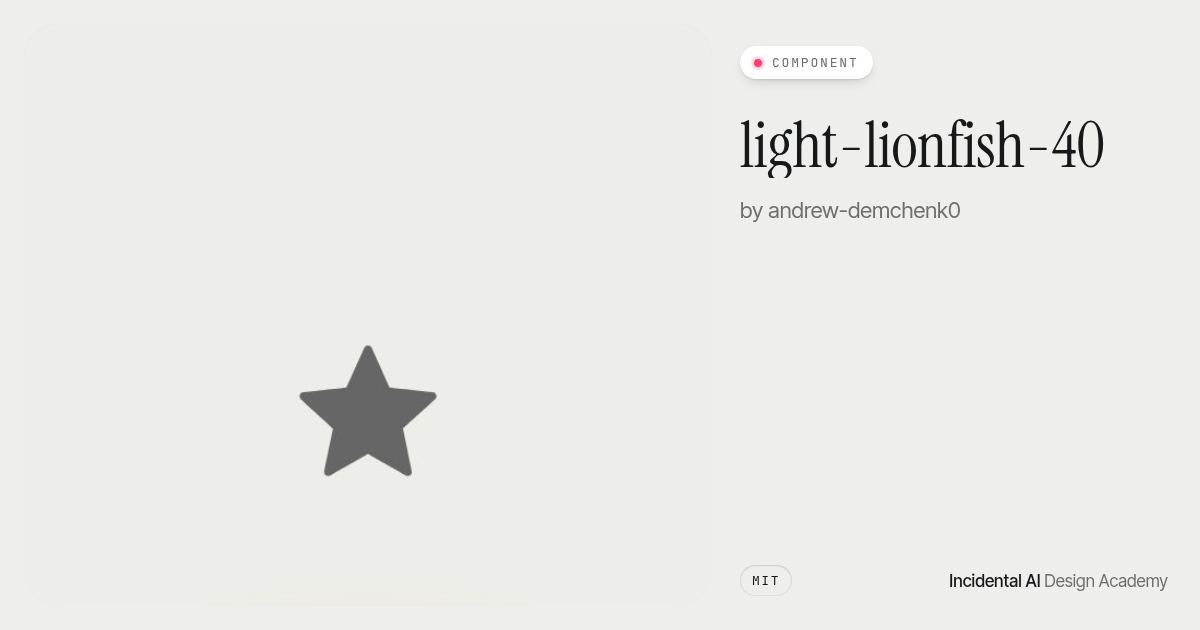
A checkbox built with plain HTML and CSS by andrew-demchenk0. Collected from Uiverse.io under the MIT licence and shown here live.
Quality report
The grade and score come from automated checks run at build or test time. If a check did not run, it is marked Not tested — numbers are never invented.
Frame rate: 60 fps average, p5 59.9 · Long tasks: 0 tasks, 0 ms total, longest 0 ms · Source gzip 1.6 KB · Runtime 680 B
Issues 0 · Screen reader: Pass
No continuous motion
No overflow
Frame rate and long-task figures were measured in headless Chromium with software WebGL. They are only comparable between components on this site, and do not represent real devices.
Not applicable: no visible animation at rest. Hover-triggered animation was not tested.
No axe-core violations.

Checked Nov 15, 2026 · Figures come from an automated script, not from hand-written samples.
Shown at real size.
The copy starts with the licence notice. Keep it when you use the code.
<label class="container">
  <input type="checkbox">
  <svg height="24px" id="Layer_1" version="1.2" viewBox="0 0 24 24" width="24px" xml:space="preserve" xmlns="http://www.w3.org/2000/svg" xmlns:xlink="http://www.w3.org/1999/xlink"><g><g><path d="M9.362,9.158c0,0-3.16,0.35-5.268,0.584c-0.19,0.023-0.358,0.15-0.421,0.343s0,0.394,0.14,0.521    c1.566,1.429,3.919,3.569,3.919,3.569c-0.002,0-0.646,3.113-1.074,5.19c-0.036,0.188,0.032,0.387,0.196,0.506    c0.163,0.119,0.373,0.121,0.538,0.028c1.844-1.048,4.606-2.624,4.606-2.624s2.763,1.576,4.604,2.625    c0.168,0.092,0.378,0.09,0.541-0.029c0.164-0.119,0.232-0.318,0.195-0.505c-0.428-2.078-1.071-5.191-1.071-5.191    s2.353-2.14,3.919-3.566c0.14-0.131,0.202-0.332,0.14-0.524s-0.23-0.319-0.42-0.341c-2.108-0.236-5.269-0.586-5.269-0.586    s-1.31-2.898-2.183-4.83c-0.082-0.173-0.254-0.294-0.456-0.294s-0.375,0.122-0.453,0.294C10.671,6.26,9.362,9.158,9.362,9.158z"></path></g></g></svg>
</label>/* From Uiverse.io by andrew-demchenk0 - Tags: yellow, checkbox, star */
.container input {
position: absolute;
opacity: 0;
cursor: pointer;
height: 0;
width: 0;
}
.container {
display: block;
position: relative;
cursor: pointer;
user-select: none;
}
.container svg {
position: relative;
top: 0;
left: 0;
height: 50px;
width: 50px;
transition: all 0.3s;
fill: #666;
}
.container svg:hover {
transform: scale(1.1);
}
.container input:checked ~ svg {
fill: #ffeb49;
}Controls · HTML · CSS · JS
Edit the code and tune it with the controls. The preview updates as you type.

This component runs from a bundled build, so its script is read-only here. Edit the HTML and CSS; the full source is in the Code tab.
Edit every component live, tune it with controls, download the full source and copy the advanced prompts.
$49 one-timePlaceholder price
Test mode: no real payment is taken.
Free: preview, copy buttons and the lesson notes.
A large grey star grows a little on hover and fills sunny yellow when checked, the simplest way to save a favourite.
Favourites, bookmarks and starred items in lists.
Change the #ffeb49 checked fill, the #666 resting fill, the 50px size and the 1.1 hover scale.
Build a "Star favourite checkbox" component in plain HTML, CSS and JavaScript (no framework). A large grey star grows a little on hover and fills sunny yellow when checked, the simplest way to save a favourite. Use it for: Favourites, bookmarks and starred items in lists. Expose these controls: Change the #ffeb49 checked fill, the #666 resting fill, the 50px size and the 1.1 hover scale. Support light and dark themes, respect prefers-reduced-motion with a still frame, keep text readable and controls keyboard accessible. Write original code; do not copy from paid or restricted component libraries.
A longer prompt with tuning, accessibility and integration steps.
 mobinkakei
 Lorenzo Cabra
 barisdogansutcu
 mrhyddenn
 cbolson
 JaydipPrajapati1910
 gharsh11032000
 Lorenzo Cabra